
Selling digital products is one of the fastest, most scalable ways to build an online income. Unlike physical retail, you do not have to deal with inventory, shipping fees, or manufacturing costs. Once you create a digital asset, you can sell it an unlimited number of times with almost zero extra effort or overhead.
Whether you want to escape the 9-to-5 grind or build a reliable side hustle, this comprehensive guide will show you exactly how to launch digital products and start selling them step by step—even if you are a complete beginner.
What Are Digital Products?

Digital products are downloadable or online-access files that customers can use instantly after purchase. They have no physical form, meaning they exist entirely in the digital space.
Common Examples of High-Demand Digital Products
- E-books and Guides: Instructional manuals, recipes, or deep-dives into a niche.
- Online Courses: Video tutorials or text-based modules that teach a specific skill.
- Design and Productivity Templates: Canva layouts, Notion dashboards, or Excel budgeting sheets.
- Printables: Wall art, planners, journals, and educational worksheets for kids.
- Stock Media: High-quality photos, background videos, or music tracks for content creators.
- AI Prompt Packs: Structured prompt lists for ChatGPT, Midjourney, or Claude.
- Software and Code: WordPress plugins, web tools, or custom scripts.
- Memberships: Ongoing access to premium content, communities, or monthly assets.
Because these products require no raw materials to reproduce, they are incredibly cheap to make and highly scalable for creators.
Why Digital Products Are a Smart Business Model

Before jumping into the step-by-step launch process, it is important to understand why this business model is so powerful. It bypasses almost every roadblock traditional businesses face.
1. No Inventory or Shipping Costs
With physical products, you have to buy stock upfront and pay shipping companies to deliver items. If a product damages in transit, you lose money. Digital products remove this entirely. Your product lives securely in the cloud, ready for instant download.
2. High Profit Margins
Because you do not have to pay for manufacturing or shipping for every single order, your profit margins can easily reach 90% or higher. Your only real costs are minor software subscriptions, transaction fees, or website hosting.
3. Complete Automation
You can fully automate a digital product store. A customer visits your site, buys your file, and an automated system delivers the download link to their email inbox instantly. You can literally make sales while you sleep, travel, or work on other projects.
4. Global Market Reach
A physical store is limited by its local geography or shipping zones. A digital storefront is open to the entire world from day one. You can sell to customers in the USA, the UK, Europe, or Asia simultaneously without changing your operational setup.

Step 1: Choose a Profitable Digital Product Idea
The foundation of your business relies entirely on demand. You cannot simply create something you think is cool; you must create something people are actively looking to buy.
Top Niche Product Ideas for Beginners
- Career: Professional resume templates, cover letter guides, or LinkedIn profile optimization kits.
- Finance: Family budget planners, debt payoff trackers, or investment spreadsheets.
- Marketing: Social media content calendars, email marketing templates, or hook-driven caption lists.
- Tech & AI: Curated AI prompt packs for marketers, copywriters, or developers.
- Health & Fitness: 30-day home workout guides, customized macro meal planners, or habit trackers.
- Education: Study guides for specific exams, classroom printables for teachers, or language learning flashcards.
How to Validate Your Idea Using Free Research Tools
To ensure your idea has actual commercial value, validate it before spending days building it.
- Google Trends: Search for your topic to see if general interest is rising or steady over time.
- Etsy Best Sellers: Search for templates or printables in your niche. Look for items with the “Best Seller” or “In 20+ people’s carts” badges.
- Amazon Kindle Store: Look at the top-selling non-fiction e-books in your niche. Read the 2-star and 3-star reviews to find out what information those books missed—that is your gap to fill.
- Reddit and Forums: Browse subreddits related to your niche. Look for recurring problems where users ask, “Is there a tool or template that does X?”
- Social Media Trends: Check TikTok, Instagram Reels, and YouTube Shorts. If educational videos on a topic get hundreds of thousands of views, an audience is eager to learn more.
Validation Rule: If you see other people already selling similar products successfully, that is a green light. Competition means there is a active pool of buyers willing to spend money.

Step 2: Identify and Refine Your Target Audience
You cannot sell a digital product to “everyone.” If your marketing attempts to speak to every person alive, it will resonate with no one. You must narrow down your scope to a specific group of people experiencing a specific pain point.
Defining Your Target Persona
To build a clear picture of your ideal buyer, answer these three basic questions:
- Who needs this product most? (Demographics, profession, or lifestyle).
- What specific problem does this product solve? (The friction keeping them stuck).
- What tangible result will they get after using it? (The transformation or time saved).
Narrowing from Broad to Highly Specific
A broad product feels generic and low-value. A hyper-targeted product feels premium and necessary. Look at how focusing your angle changes the overall appeal:
- Too Broad: A generic “Fitness Plan.”
- Highly Targeted: A “30-Day Dumbbell Workout Guide for Busy Office Workers Who Have Only 20 Minutes a Day.”
- Why it works: An office worker will ignore a generic fitness plan, but they will buy the 20-minute guide because it speaks directly to their lack of time.
- Too Broad: A “Social Media Guide.”
- Highly Targeted: An “Instagram Reels Hook and Script Kit for Real Estate Agents to Get Organic Leads.”
- Why it works: Real estate agents do not want a basic social media guide; they want specific scripts that bring them housing clients.

Step 3: Create Your Digital Product (The 10-Minute Method)
Creating a digital asset does not require complex design skills or thousands of dollars in software. You can design an elegant, highly valuable PDF e-book or template in minutes using beginner-friendly layout tools.
Recommended Content Creation Tools
- Canva: Ideal for designing e-books, PDF guides, printables, and presentation slides. It features thousands of free pre-made templates.
- Google Docs or Notion: Excellent for writing text-heavy guides, resource lists, worksheets, or building functional dashboards.
- ChatGPT or Claude: Great for brainstorming titles, formatting outlines, or generating rough drafts for your content modules.
- Figma: The industry standard for digital user interface designs, website wireframes, or advanced graphics components.
- Microsoft Excel or Google Sheets: The go-to option for creating functional budget systems, business trackers, or schedules.
Step-by-Step Guide: Designing an E-book in Canva
An e-book or PDF guide is one of the easiest formats to launch first. Here is the workflow to build one fast:
- Select a Template: Open Canva, type “Ebook A4 template” into the search bar, and look for options containing multiple pages. Choosing a multi-page template gives you pre-made layouts for your cover, table of contents, text pages, and graphics sections.
- Customize the Cover: Click the template to open it. Upload a relevant image or a clean headshot. Adjust the colors to pop and match your theme. Use bold, clear fonts so the text remains readable even on small mobile screens.
- Draft Your Content: Type your copy in a Google Doc first to check your spelling and structure. Once your text is polished, copy and paste it into the Canva text fields.
- Use Content Duplication: When you finalize a clean page layout, click the “Duplicate Page” icon. This copies the exact layout for your next section, saving you from rebuilding text boxes and margins from scratch.
- Incorporate Graphics Elements: Navigate to the “Elements” tab on Canva’s left sidebar. Search for free icons or illustrations that fit your topic (e.g., search “makeup” for a beauty guide or “bar chart” for a finance sheet) and place them subtly around your text to break up long paragraphs.
- Export as a Web-Ready PDF: Click the Share button in the top-right corner, select Download, and change the file type from PNG to PDF Standard. This compresses the file beautifully for quick downloading and clean reading across all devices.

+-------------------------------------------------------------+
|                        CANVA WORKFLOW                       |
+-------------------------------------------------------------+
| Select Template -> Add Copy -> Duplicate Layouts -> Export  |
+-------------------------------------------------------------+
Create an iPad or Desktop Product Mockup
When people buy online, they like to see what they are buying. A flat PDF cover does not feel tangible. By putting your cover image inside a digital screen mockup, you create a stronger desire to buy.
- Go back to the Canva search bar and type “Lay flat mockup” or “iPad mockup.”
- Choose a clean template featuring an iPad, laptop, or phone screen sitting on a desk.
- Export page one of your digital product as a high-quality PNG photo.
- Upload that PNG into Canva and drag it directly into the screen frame of your mockup.
- Save this new graphic. You now have a professional visual asset to use on your store landing pages and social media posts.
Step 4: Build Your Simple Sales Platform

To sell your product automatically, you need an online home where customers can view your offer, enter their payment details, and instantly download their files.
While third-party checkout networks exist, many take significant cuts out of your hard-earned revenue. For instance, platform marketplaces like Gumroad charge a flat 10% fee on every single transaction. As your business grows into thousands of dollars a month, that 10% fee drains your profits fast.
Building a self-hosted website gives you complete control over your branding, design, search engine optimization (SEO), and profit margins.
Setting Up a Store Using the Hostinger AI Website Builder
Using host platforms like Hostinger with built-in AI generation tools allows absolute beginners to launch an optimized, functional online store in less than 10 minutes without writing a single line of code.
- Choose a Plan: Select a robust hosting option like the Hostinger Business Plan. This provides enhanced performance speeds, integrated SEO tools, and a free domain name.
- Launch the AI Website Builder: Inside your hosting dashboard, select the AI Builder option to start an automated setup.
- Claim Your Free Domain: Input your preferred business name (e.g.,
yourbrand.com). If you already own a domain elsewhere, you can link it right inside this panel. - Describe Your Business to the AI: The AI tool will ask for details to build your customized layout. Input your brand name, set the website type to Online Store, and provide a clear, descriptive paragraph about what you sell.
- Good Prompt Example: “An online store selling premium e-books, spreadsheets, and downloadable templates for digital entrepreneurs. The goal is to educate, inspire, and provide actionable resources for beginners.”
- Let the AI Generate the Layout: Click Start Creating. The AI engine will instantly assemble your pages, headers, images, and text boxes based on your exact description.
+---------------------------------------------------------------+
|                       AI WEBSITE BUILDER                      |
+---------------------------------------------------------------+
| Input Details -> Set Store Type -> Add Persona -> Auto-Launch |
+---------------------------------------------------------------+

Customizing and Polishing Your AI-Generated Store
Once the AI finishes generating your site, treat it as a foundational canvas. Spend a few minutes making it your own:
- Adjust Your Colors and Typography: Use the global styles menu on the left toolbar to change background colors and select clean, highly readable fonts.
- Optimize Header Spacing: Crop or shrink overly massive banner spaces. Drag your store products higher up on the homepage so visitors see what you are selling the moment your site loads.
- Build an About Me Page: Add a separate page via the page navigation panel. Use a clean multi-row template to explain who you are, your experience, and why people should trust your advice.
- Verify Mobile Layout Performance: Over 90% of your incoming traffic will browse your storefront on a mobile smartphone. Toggle the Mobile View icon at the top of the editor. Rearrange text sizes, button widths, and image alignments to guarantee a smooth mobile shopping experience.
Uploading Your Digital Asset and Connecting Payments
- Navigate to your site’s store manager panel by clicking the shopping bag icon.
- Delete any default pre-made placeholder products included in the template layout.
- Click Add Product and choose the digital product configuration.
- Upload your Canva-designed iPad mockup photo as the main display graphic.
- Input an engaging, benefit-driven product title.
- Write the Description: Use the integrated AI text writer within the description block. Type a simple prompt detailing your product’s key advantages, and let the AI instantly build a persuasive product description box.
- Set Your Pricing and File Delivery: Enter your final price. Set the stock quantity to unlimited. Finally, upload your digital PDF or template link into the secure file delivery slot. When a user checks out, the platform sends this file to them automatically.
- Link Your Payment Gateways: Go to your store settings tab and securely connect your PayPal or Stripe accounts. This allows you to collect credit card payments directly from worldwide buyers.
- Go Live: Click the Go Live button in the upper right-hand corner of your screen to push your new storefront to the public internet.

Step 5: Set the Right Pricing Strategy
Pricing your digital products can feel tricky. If you price too high, beginners will not buy. If you price too low, you undervalue your skills and need massive amounts of customers just to make a meaningful income.
The Tiered Pricing Framework
- Low-Ticket ($5 – $20): Quick, impulsive purchases like single-page checklists, basic printables, budget planners, or short reference guides. These require minimal thought from the customer before buying.
- Mid-Ticket ($20 – $100): Comprehensive resource bundles, deep e-books, master lists, complex Notion setups, or multi-tab Excel automation tools. Buyers expect detailed instructions and real transformation here.
- High-Ticket ($100+): Full video academies, complete business starter blueprints, premium masterclasses, or membership portals with ongoing direct support.
Beginner Strategy: Start out in the low-to-mid ticket range ($15 to $29). This lowers the barrier to entry, letting you gather customer reviews quickly. Once you stack up positive testimonials, you can bundle your items together and raise your pricing.

Step 6: Drive Targeted Traffic to Your Product Storefront
An elegant website means nothing if nobody knows it exists. To generate steady sales, you must establish a marketing system that channels interested buyers to your product pages.
1. Organic Search Engine Optimization (SEO)
SEO is the ultimate strategy for building passive, long-term traffic. By writing high-value articles around your product’s topic, you can rank your site on search engines like Google.
- Find keywords with high search volume but low competition using tools like Google Keyword Planner or Ahrefs.
- If you are selling budget spreadsheets, write deep tutorials like “How to Start Budgeting for a Family on a Single Income.”
- Naturally integrate links to your digital template throughout your article content where readers need a tool to execute your advice.
2. Strategic Social Media (TikTok, Instagram Reels, YouTube Shorts)
Short-form vertical video is one of the fastest ways for a brand-new account to reach millions of people organically without a advertising budget.
- Do not just yell “buy my product” in your videos. Instead, provide educational value first.
- Video Formula: Show a common problem, demonstrate how to solve it in three simple steps, and show the end result using your template tool.
- Call to Action (CTA): Direct viewers to the link in your bio to download your complete tool kit.
3. Pinterest Marketing
Pinterest functions less like a social app and more like a visual search engine. Users browse Pinterest actively looking for ideas, templates, guides, and inspiration to buy.
- Design clean, vertical pin images using Canva that highlight your product’s main solution.
- Write search-friendly titles and descriptions for your pins using relevant keywords like “minimalist resume template” or “meal prep printable.”
- Attach your store product page link directly to the pin so users land straight on your checkout page when they click your image.
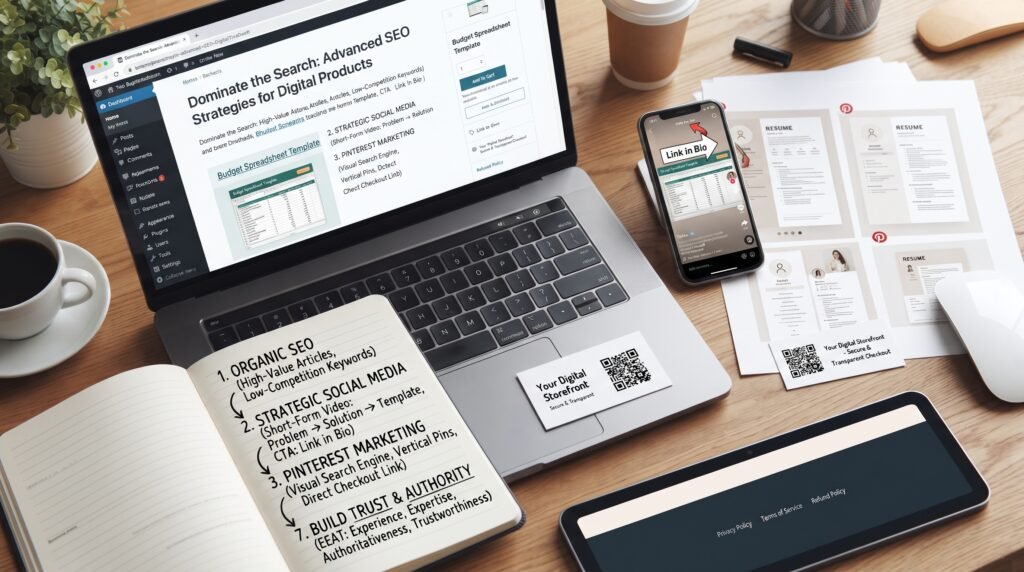
Step 7: Build Trust and Authority (The EEAT Strategy)
Search engines like Google prioritize content that demonstrates real human authority and expertise. More importantly, real humans only buy from creators they trust.
How to Apply EEAT to Your Digital Product Store
- Experience: Share your personal story. If you sell a study guide, explain how you used that exact guide to ace your own university exams. Show real screenshots of your journey.
- Expertise: Break your topics down thoroughly. Write clear, comprehensive answers to complex questions on your site to prove you understand your niche inside and out.
- Authoritativeness: Build a reputation over time. Get active in your niche community, cite reputable scientific studies or market data in your guides, and showcase any certifications you hold.
- Trustworthiness: Keep your checkout process clear and professional. Publish easy-to-find links to your store’s privacy policy, terms of service, and refund policy in your website footer. Use clear product mockups so buyers know exactly what file types they will receive.

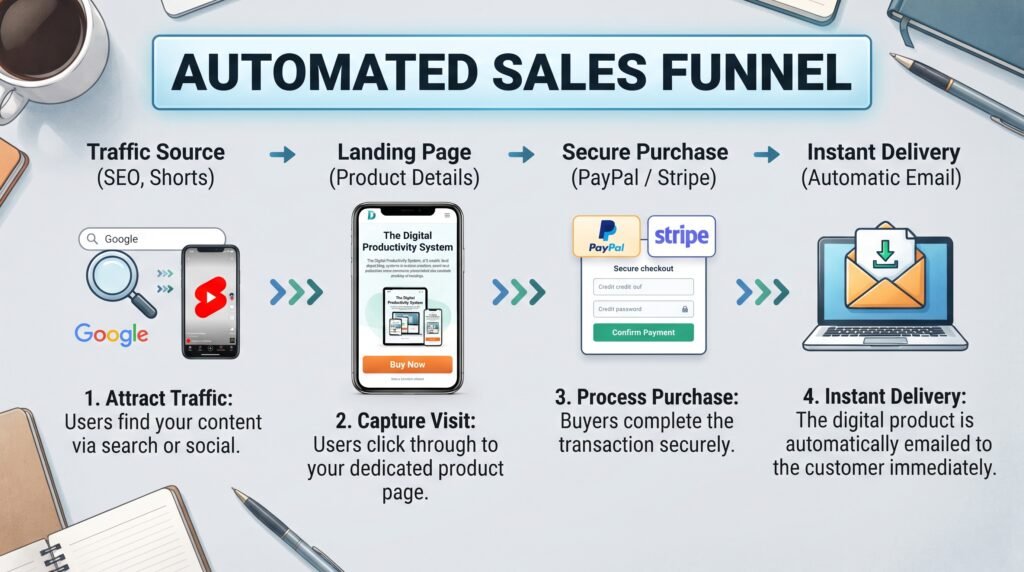
Step 8: Create an Automated Sales Funnel
As your organic traffic grows, link your components together into an automated sales funnel. This funnel moves a casual browser into an active, paying buyer automatically.
+--------------------------------------------------------------------------+
|                          AUTOMATED SALES FUNNEL                          |
+--------------------------------------------------------------------------+
| Traffic Source -> Landing Page -> Secure Purchase -> Instant Delivery    |
| (SEO, Shorts)  | (Product Details)| (PayPal / Stripe) | (Automatic Email)|
+--------------------------------------------------------------------------+
- Attract Traffic: A user discovers your helpful tutorial blog post on Google or watches an educational tip video you posted on YouTube Shorts.
- Capture the Visit: The user clicks your link and lands on your clean, mobile-optimized product page built with your website platform.
- Process the Purchase: The buyer reviews your benefit-driven descriptions, looks over your iPad mockup graphic, and completes their payment through Stripe or PayPal.
- Instant Digital Delivery: The platform’s automated file delivery system processes the payment and instantly drops the web-ready PDF or template access link into the customer’s email inbox.
Common Marketing Mistakes Beginners Need to Avoid
- Building Items with Zero Market Demand: Do not spend weeks building a product without validating it first. Make sure people are already actively searching for solutions to that problem.
- Setting Prices Too High at Launch: Avoid charging high-ticket prices ($100+) before you have built up customer reviews and proven authority in your niche.
- Ignoring Consistent Content Marketing: A beautiful website will not generate sales on its own. Commit to a steady schedule of uploading helpful SEO blog articles or posting daily short-form social videos to keep fresh traffic finding your pages.
- Directly Copying Your Competitors: Look to successful creators in your space for general design layout inspiration, but always create your own unique assets and text copy from scratch.
Key Takeaways
| Step | Action Item | Success Metric |
| 1. Idea Selection | Research rising trends on Etsy, Reddit, and Google Trends. | Clear validation evidence. |
| 2. Target Audience | Narrow your scope down to a specific user and specific problem. | A clear target buyer persona. |
| 3. Creation Phase | Draft text copy and design a clean multi-page layout in Canva. | A web-ready PDF download file. |
| 4. Store Setup | Deploy an online storefront using a fast AI website builder. | Fully active checkout payments. |
| 5. Traffic Engine | Post short videos and publish search-optimized blog posts. | Incoming daily store traffic. |
Frequently Asked Questions (FAQ)
1. Do I need specialized technical skills to sell digital products?
No. Advanced design or coding skills are no longer required to get started. Free online design systems like Canva make formatting graphics simple with drag-and-drop templates. Similarly, modern hosting platforms provide automated AI builders that generate entire online stores in minutes using simple text descriptions.
2. How much income can a beginner expect to make?
Your earnings depend entirely on the quality of your validation research and the amount of consistent traffic you drive to your storefront. Many beginners start out generating an extra $100 to $500 per month within their first few months, while established creators scale their operations to earn thousands of dollars every week by bundling assets and ranking on search engines.
3. What is the single best online platform to sell my products?
While third-party marketplaces are quick to set up, they often take high transaction fees (up to 10% per sale) and limit your branding control. Launching your own website using a self-hosted platform like Hostinger gives you full design flexibility, better built-in SEO tools, and lets you keep nearly 100% of your product revenue.
4. Are digital products still a profitable business model?
Yes. The global demand for digital downloads, templates, and online learning resources continues to grow rapidly. As more individuals embrace remote workflows, online education, and creative side hustles, the market for structured AI prompt packs, business trackers, and productivity planners remains highly profitable.

Conclusion
Launching a digital product business is one of the smartest, most cost-effective ways to establish a reliable source of income in today’s digital economy. It requires no extensive startup capital, zero physical warehouse storage, and no complicated logistics setups. All you need to succeed is a validated idea, a clean web presence, and a commitment to helping your audience solve a specific problem.
Start out simple. Focus on building one useful, high-value asset that addresses a single core pain point for your ideal buyer. Once you launch your storefront and automate your delivery funnel, continue publishing valuable content to drive traffic and scale your monthly income.