

AI has changed the way people create content. A task that once took hours can now take minutes. You can give AI a topic, ask for an outline, and get a full draft almost instantly. For YouTube creators, this can make scriptwriting much faster. For bloggers, it can help with research, ideas, outlines, and even first drafts.
But there is one problem: fast does not always mean good.
You have probably seen AI-written content that looks fine at first, but after reading a few paragraphs, it starts to feel the same. The introduction sounds predictable. The advice is too general. The examples are not very interesting. Every section follows the same pattern, and the whole piece feels like it was written by a machine.
The problem is not always the AI itself. Very often, the problem is how we use it.
If you give AI a short and vague instruction like “Write a YouTube script about making money online,” you should not be surprised when the result sounds generic. AI can produce the words, but you still need to decide what the content should say, who it is for, what makes it useful, and why someone should keep reading or watching.
That is why the best way to use AI is not as a replacement for your own thinking. Think of it as a writing assistant that can help you work faster while you stay in control of the final result.
In this guide, you will learn how to use AI to create better YouTube scripts and blog articles. We will cover everything from understanding your audience and building a strong structure to writing better hooks, creating useful prompts, making AI writing sound more natural, editing the final draft, checking facts, and improving content for search engines.
The goal is simple: use AI to make your content better—not just faster.

2. What Makes AI-Generated Content Actually Good?
AI-generated content is not automatically good just because it is well-written or grammatically correct. Good content needs to be useful, clear, interesting, and written for a real person.
Before asking AI to write anything, there are a few things you should figure out first.
2.1 Clear Purpose
Every piece of content should have a clear purpose.
Are you trying to teach something, solve a problem, explain an idea, or help someone make a decision?
For example, an article about YouTube scripts should not simply explain what a script is. It should help the reader understand how to create a better one.
When the purpose is clear, it becomes much easier to tell AI what you actually want.
2.2 Understanding the Audience
Good content speaks to a specific person.
A beginner who has never written a YouTube script needs a very different explanation from an experienced creator who has already published hundreds of videos.
Think about what your audience knows, what they are struggling with, and what they want to achieve. Then give that information to AI before asking it to write.
2.3 Strong Structure
Even useful information can become difficult to follow if it has no clear structure.
A good piece of content should move naturally from one idea to the next. For example, you might start with the problem, explain why it happens, show the solution, and then give practical examples.
A clear structure also helps AI produce a much more focused first draft.
2.4 Useful Information
Readers do not need more words. They need useful information.
Instead of adding paragraphs just to make an article longer, focus on information that helps the reader do something, understand something, or make a better decision.
2.5 Original Examples and Insights
This is where your content can become much more valuable.
AI can explain common ideas, but your own examples, experiences, comparisons, opinions, and observations can make the content more interesting and different from hundreds of similar pages.
2.6 Natural Language
Good content should sound like a person talking to another person.
You do not need complicated vocabulary or overly formal sentences. Simple words, clear explanations, and natural transitions usually make content easier to read.
2.7 Accurate Information
AI can sometimes give you outdated, incomplete, or incorrect information. That is why important facts should be checked before publishing.
If you mention statistics, product features, prices, research, or specific claims, verify them using reliable sources.
The main idea is simple:
Don’t start with the prompt. Start with the content strategy.
Once you know what you want to say and who you want to say it to, AI becomes much more useful.
3. AI Writing vs. Generic AI Writing: What’s the Difference?
There is a big difference between using AI to create content and simply asking AI to write something for you.
For example, imagine giving an AI tool this instruction:
“Write me a 2,000-word article about YouTube.”
You will probably get a complete article. It may even have a good introduction, several headings, and a conclusion.
But that does not mean it will be a good article.
The problem is that the instruction gives AI almost no information about the reader, the purpose, the angle, or what makes the article different. The result can easily become a collection of general advice that sounds similar to many other articles online.
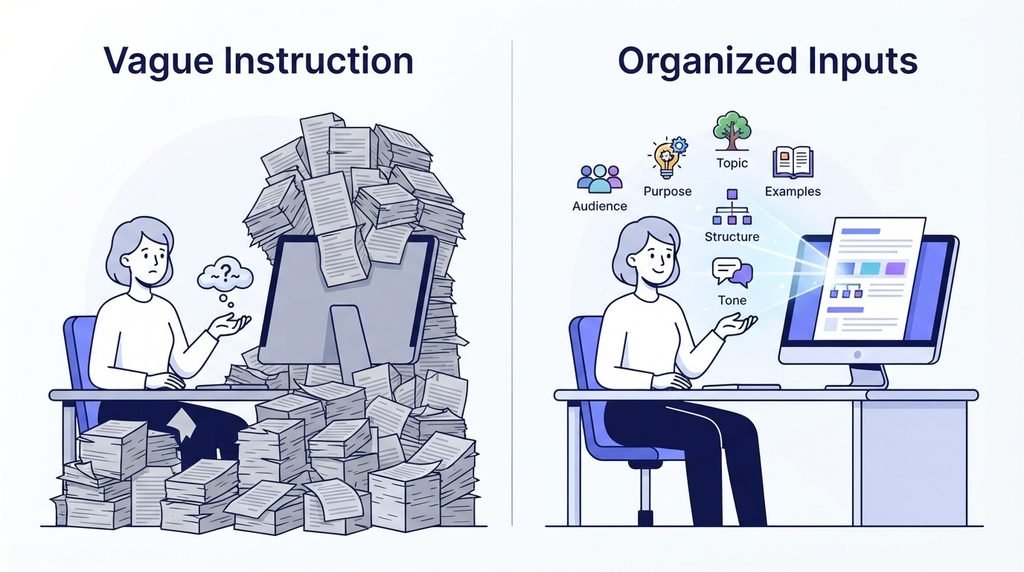
Common Problems With Generic AI Writing
Predictable introductions: The article may begin with the same broad statement readers have seen many times before.
Repetitive wording: The same ideas can appear again and again with slightly different sentences.
Too many unnecessary headings: AI may divide simple ideas into several sections just to make the article look longer.
Vague advice: Instead of showing readers exactly what to do, the content may give general advice such as “be consistent” or “understand your audience.”
Too much filler: Some paragraphs add words without adding anything useful.
No original perspective: The content may explain what is already commonly known without giving the reader a new idea, example, or useful way to look at the topic.
Repetitive conclusions: The ending may simply repeat everything that was already said.
None of this means AI is bad at writing. It means AI needs better direction.
A stronger content process looks more like this:
Research → Understand the audience → Choose an angle → Build the structure → Use AI to create a draft → Edit it yourself → Fact-check it
This approach gives AI the information it needs to produce something more focused.
Most importantly, you should not treat the first AI response as the finished article. Use it as a starting point. Add your own examples, remove unnecessary sections, improve weak explanations, check important facts, and make sure every part actually helps the reader.
The goal is not to make AI write everything for you. The goal is to use AI to help you create better content in less time.
4. Understand Your Audience Before Asking AI to Write
Before you ask AI to write a script or article, you need to know who you are writing for.
This sounds simple, but it is one of the biggest differences between useful content and generic content. A beginner, an experienced creator, and a business owner may all search for the same topic, but they do not need the same explanation.
For YouTube creators, YouTube’s Audience reports can show useful information about who is watching, including things such as age, geography, viewing behavior, and whether viewers are new or returning. You can use this information to make better decisions about your content.
4.1 Who Are You Writing For?
Start by describing your ideal reader or viewer.
Are they a complete beginner? Someone with some experience? A professional looking for advanced information?
The more clearly you can describe this person, the easier it becomes to tell AI what kind of language and examples to use.
4.2 What Does the Audience Already Know?
Do not explain basic ideas to someone who already understands them. At the same time, do not assume a beginner knows terms that you use every day.
Your content should meet people at their current level.
4.3 What Problem Are They Trying to Solve?
Think about the reason they searched for your topic in the first place.
Maybe they cannot write a good YouTube hook. Maybe their AI-generated articles sound repetitive. Maybe they do not know how to turn an idea into a complete script.
Find the real problem first. Then build the content around solving it.
4.4 What Do They Want After Reading or Watching?
A good piece of content should lead somewhere.
Do you want the reader to understand a concept, learn a skill, avoid a mistake, or complete a specific task?
Once you know the desired result, you can ask AI to help you create content that moves the audience toward that result.
4.5 What Language Should You Use?
Use language that your audience can easily understand.
If you are writing for beginners, keep explanations simple. If your audience is experienced, you can use more specific terms and go deeper into the subject.
Do not make your writing complicated just to make it sound professional.

A Simple Audience Worksheet
Before opening your AI tool, fill this out:
- Audience: Who is this content for?
- Knowledge level: Beginner, intermediate, or advanced?
- Main problem: What are they struggling with?
- Desired result: What should they achieve?
- Biggest concern: What might stop them?
- Tone: Friendly, professional, casual, educational, or something else?
- Content format: YouTube video, blog article, tutorial, review, or guide?
You can then give these details to AI before asking it to write.
This small step can make a big difference because AI is no longer trying to write for “everyone.” It has a clear person and a clear goal to work with.
And if you already have a YouTube channel, do not guess everything about your audience. Check your own data. YouTube recommends using audience insights to understand what viewers watch and to help plan future content.
5. Build the Right Structure Before Writing
One of the easiest ways to get a better result from AI is to plan the structure before asking it to write the full content.
If you simply tell AI to write a 2,000-word article or a 10-minute YouTube script, it has to make many decisions on its own. It has to decide what to say first, what to explain next, which points deserve more attention, and how everything should end.
Sometimes it gets those decisions right. Sometimes it does not.
A simple outline gives AI a clear path to follow.
For YouTube Scripts
A useful basic structure looks like this:
Hook → Introduction → Main Content → Examples or Stories → Rehooks → Conclusion → CTA
The hook gives viewers a reason to keep watching.
The introduction quickly explains what the video is about and sets up the main idea.
The main content delivers the information or story the viewer came for.
Examples and stories make difficult or abstract ideas easier to understand and can make the script feel more personal.
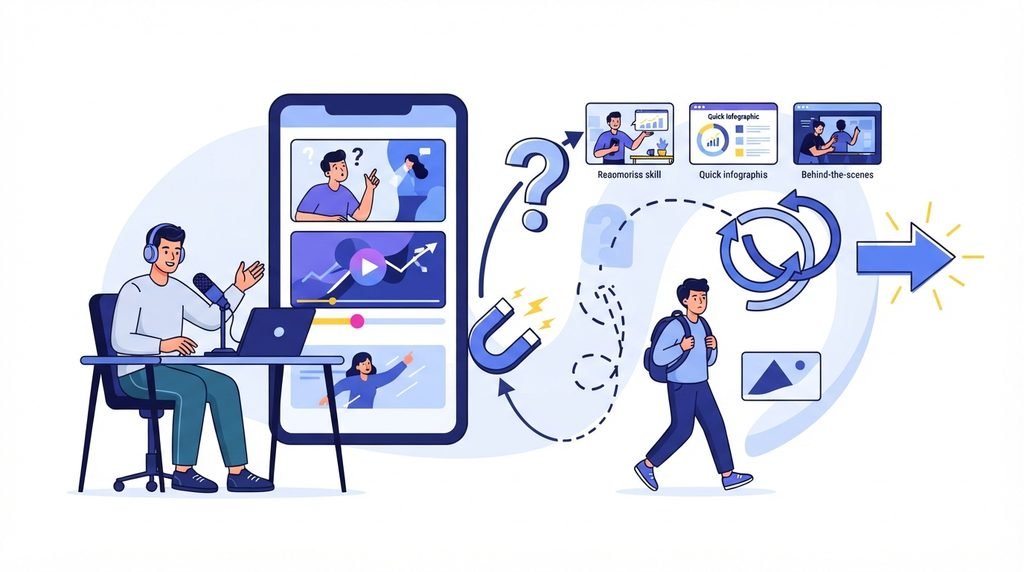
Rehooks give viewers another reason to stay as the video moves from one section to the next. They can be questions, surprising points, new information, or a quick preview of what is coming.
The conclusion brings the main idea together, while the CTA gives viewers a clear next step when one is appropriate.
For Articles
A blog article can follow a different structure:
Title → Introduction → Main Sections → Examples → Evidence → Practical Steps → FAQs → Conclusion
The exact structure will change depending on the topic. A product review does not need the same structure as a beginner’s guide, and a tutorial may need step-by-step instructions instead of long explanations.
The important thing is that every section should have a purpose.
For example, if a section does not answer a question, explain an important idea, provide useful evidence, or help the reader take action, ask yourself whether it needs to be there.
Give AI the Structure First
Instead of saying:
“Write a 2,000-word article about AI content writing.”
try giving AI more direction:
“Write a beginner-friendly article about using AI for content writing. Start by explaining why generic AI content often feels repetitive. Then explain how to understand the audience, build an outline, write the first draft, add original examples, edit the content, and fact-check important claims. Use simple English and practical examples.”
The second instruction gives AI much more to work with.
You can even create the outline yourself and ask AI to improve it before writing the full draft.
The better your structure, the less AI has to guess. And when AI has less to guess, you have more control over the final content.

6. How to Write Better YouTube Scripts With AI
AI can make YouTube scriptwriting much faster, but a good script still needs a clear idea, a strong structure, and a reason for the viewer to keep watching.
The easiest way to get a better result is to stop asking AI to “write a script” and start giving it a clear plan.
6.1 Start With the Audience and Topic
Before writing the first line, decide who the video is for.
A video for complete beginners should not sound like a video for experienced creators. Think about what your viewers already know, what they want to learn, and what problem you are helping them solve.
Then give that information to AI.
For example:
“Write a YouTube script for beginner creators who struggle to keep viewers interested. Use simple English, practical examples, and a friendly tone.”
That is much more useful than simply saying, “Write a YouTube script about audience retention.”
6.2 Create a Strong Hook
The first few moments of a video matter because viewers can leave at any time.
Your hook should quickly confirm that the viewer is in the right place while also giving them a reason to continue.
A simple hook can do three things:
- Confirm the click: Show that the video is about what the viewer expected.
- Create curiosity: Introduce something they want to know.
- Give them a reason to stay: Make it clear what they will learn, discover, or get from the video.
For example, instead of:
“Today we are going to talk about YouTube scripts.”
Try something more specific:
“Your YouTube script may be losing viewers before you even reach your first main point. Here are the mistakes that cause it—and how to fix them.”
YouTube also provides creators with audience-retention reports that can help identify which moments hold viewers’ attention and where they may lose interest. That data can be useful when improving future scripts. YouTube audience retention guidance
6.3 Build Curiosity Throughout the Script
A strong opening is not enough. The script should give viewers reasons to continue throughout the video.
You can create curiosity with:
- unanswered questions
- open loops
- unexpected information
- useful reveals
- problems that are explained later
For example, you might introduce a common mistake early in the video but explain the solution after showing why the mistake happens.
The key is not to hide information just to keep people watching. Give value while creating a natural reason to hear the next part.
6.4 Make the Main Points Valuable
Do not turn the main section into a long list of disconnected tips.
A simple structure works well:
Point → Explanation → Example → Why It Matters
If you tell viewers to “make better hooks,” explain what that means. Give them an example of a weak hook, show a stronger version, and explain why the second one works better.
This makes the advice much easier to understand and use.
6.5 Add Stories and Real Examples
Information becomes easier to remember when people can connect it to a real situation.
Instead of only telling viewers:
“Use specific examples.”
Show them one.
If you are teaching AI writing, you could show a weak AI prompt, the result it produces, and then a better prompt with a better result.
These small examples also make the script feel less like a textbook.
6.6 Use Rehooks Between Sections
A rehook is simply a small reason to keep watching as you move from one idea to another.
For example:
“But there is one more problem with this approach—and it is something most beginners completely miss.”
Then move into the next section.
Rehooks should feel natural. Do not add a dramatic sentence every thirty seconds just because you think you have to. The goal is to keep the conversation moving and give viewers a reason to care about what comes next.
6.7 Create Variation
Imagine watching a video where every section sounds exactly the same.
It would quickly become boring.
Good scripts have variation. You can change the pace by moving between explanations, examples, stories, questions, comparisons, and short conclusions.
You can also vary sentence length and avoid starting every paragraph with the same type of phrase.
AI can help with this if you specifically ask it to identify repetitive patterns and rewrite them.
6.8 Finish With a Useful CTA
The ending should not suddenly turn into:
“Like, subscribe, comment, and follow me on everything!”
A better CTA connects naturally with the video.
If you have just taught viewers how to create better AI prompts, you could invite them to try the method on their next script. If another video explains the next step, you can point viewers toward it.
The CTA should feel like a logical next step, not an interruption.
The bigger lesson is that AI should not decide everything about your script. You decide the audience, angle, structure, examples, and message. AI helps you develop and improve them.
7. How to Write Better Articles With AI
AI can help you create a blog article much faster, but the same rule applies: do not start by asking AI to write thousands of words.
Start by understanding what the reader needs.
7.1 Start With Search Intent
Before writing, ask:
“What is this person actually looking for?”
Someone searching “how to write a YouTube script” probably wants a practical process. Someone searching “YouTube script examples” may want examples they can study.
The article should match that purpose.
For SEO guidance, Google’s Search Central documentation recommends creating helpful, reliable, people-first content rather than writing mainly to attract search traffic.
7.2 Create an Outline Based on the Reader’s Questions
Once you understand the search intent, build the outline around the questions the reader needs answered.
Do not create ten headings simply because you want the article to look long.
Every section should have a job.
7.3 Write an Introduction That Gets to the Point
Your introduction does not need to explain everything.
Tell readers what problem the article solves, why it matters, and what they can expect to learn.
Then get into the useful information.
7.4 Explain Concepts Instead of Padding Word Count
Longer does not automatically mean better.
If a simple idea can be explained in 150 words, there is no reason to stretch it to 500 words just to reach a target.
A useful 3,500-word article can be better than a repetitive 5,000-word article.
7.5 Use Examples
Examples make explanations easier to understand.
Instead of saying:
“Write specific prompts.”
show the reader a weak prompt and then a stronger version.
This turns advice into something the reader can actually use.
7.6 Add Original Insights
This is one of the easiest ways to make AI-assisted content more useful.
Add your own examples, comparisons, observations, experiences, or explanations.
AI can help organize information, but your content becomes much more valuable when it includes something beyond a basic summary of what is already commonly known.
7.7 Support Important Factual Claims With Reliable Sources
Not every sentence needs a citation.
But if you mention a statistic, research finding, product feature, current price, official recommendation, or other factual claim that readers may want to verify, use a reliable source.
Whenever possible, go directly to the original or official source rather than linking to another website that simply repeats the information.
7.8 Add Internal Links Naturally
Internal links can help readers discover related content on your website.
But do not add links just because you have another article available.
Only link when the other page genuinely helps the reader understand the current topic.
For example, if you explain AI tools for YouTube and already have a detailed guide about YouTube automation tools, that can be a useful internal link.
7.9 Write FAQs Based on Genuine Reader Questions
FAQs should answer questions people are actually likely to have.
Do not add random questions just to make the article longer.
Good FAQ questions often come from common beginner problems, confusing parts of the topic, or natural follow-up questions that appear after reading the main article.
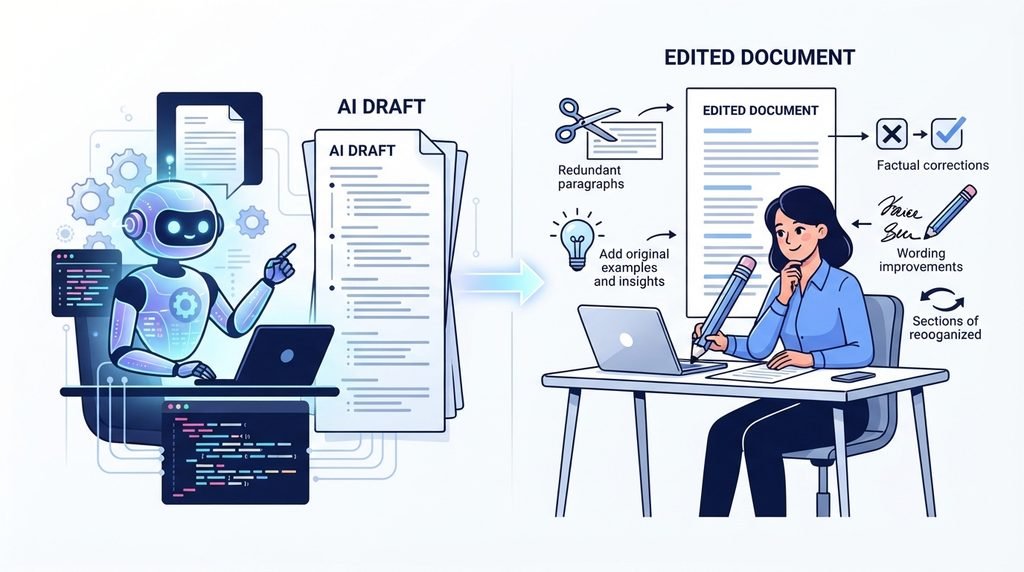
7.10 Edit the Article After AI Generates It
This step is extremely important.
Do not publish the first version AI gives you.
Read the entire article and ask:
- Does every section add something useful?
- Is anything repeated?
- Are the examples clear?
- Does the writing sound natural?
- Are the facts correct?
- Are any claims outdated?
- Are there unnecessary paragraphs?
- Does the article actually answer the reader’s question?
Then rewrite anything that needs improvement.
AI should help you create and improve the article, but you should remain responsible for the final version.
And remember: there is no magic number of words that makes an article good. If a topic genuinely needs 4,000–5,000 words, write that much. If it can be properly covered in fewer words, do not add filler just to hit a target.

8. The Best AI Prompt Formula for High-Quality Content
A good AI prompt does not need to be complicated. But it does need to give the AI enough information to understand what you want.
One of the biggest mistakes people make is giving AI a very short instruction and then expecting a great result.
For example:
“Write a YouTube script about productivity.”
That gives AI a topic, but almost nothing else.
A better prompt explains the audience, goal, context, structure, and quality you expect.
The 8-Part AI Prompt Formula
You can build stronger prompts using these eight parts:
1. Role
Tell AI what kind of writer or specialist you want it to act as.
2. Audience
Explain who will read or watch the content.
3. Goal
Tell it what the content should help the audience do or understand.
4. Topic
Give the exact subject you want to cover.
5. Context
Add important background information, examples, research, or details AI should know.
6. Structure
Explain how you want the content organized.
7. Tone
Tell AI how the writing should sound, such as friendly, simple, professional, or conversational.
8. Quality Requirements
Explain what to avoid and what the final content should include.
A Master Prompt You Can Customize
Here is a simple template you can use:
Act as a skilled content writer who understands [topic].
Audience: [describe your audience and knowledge level]
Goal: [what should the reader/viewer learn or achieve?]
Topic: [your topic]
Context: [important information, examples, sources, or background]
Structure: [list the sections or format you want]
Tone: [friendly, conversational, simple, professional, etc.]
Quality requirements: Use clear and natural language. Avoid repetition, filler, vague advice, and unnecessary headings. Use specific examples where helpful. Do not invent facts or sources. If information is uncertain or may be outdated, clearly point it out instead of guessing.
Before writing: review the instructions and create a brief outline. Then write the content following the approved structure.
You do not have to use every part for every task. A short social post may need only a few instructions, while a detailed YouTube script or article may benefit from all eight.
The most important thing is to give AI enough context to make good decisions.
Modern AI tools can also work with more detailed instructions and supporting information. For example, OpenAI’s official prompting guidance recommends giving models clear instructions and relevant context when you want more useful results.
Think of your prompt as a brief you would give to a human writer. The clearer the brief, the less guessing the writer has to do.
9. Practical AI Prompts for YouTube Scripts
Once you understand the basic prompt formula, you do not need dozens of complicated prompts. A small set of useful prompts can cover most of the YouTube scriptwriting process.
Prompt 1 — Video Ideas and Angles
When to use it: Use this when you have a broad topic but do not know which angle would make the video interesting.
Give me 10 YouTube video angles for [topic] aimed at [audience]. For each angle, explain the main problem it solves, why the audience might care, and what makes the angle different from a basic explanation. Avoid generic or repetitive ideas.
This helps you choose the idea behind the video before writing the script.
Prompt 2 — Hook Generator
When to use it: Use this after choosing your video idea.
Create 5 different hooks for a YouTube video about [topic]. The audience is [audience]. Each hook should quickly confirm what the video is about, create curiosity, and give viewers a reason to continue. Keep the language natural and avoid exaggerated clickbait.
Do not automatically choose the first hook. Compare them and improve the strongest one.
Prompt 3 — Full Script Structure
When to use it: Use this before asking AI to write the complete script.
Create a detailed structure for a [length]-minute YouTube video about [topic]. Include the hook, introduction, main points, examples, transitions, rehooks, conclusion, and CTA. Explain the purpose of each section and avoid repeating the same idea.
An outline gives you a chance to fix weak ideas before spending time writing the full script.
Prompt 4 — Improve Retention and Transitions
When to use it: Use this when the script feels flat or sections do not connect well.
Review this YouTube script and identify places where the viewer may lose interest. Suggest stronger transitions, clearer explanations, useful curiosity gaps, or examples where appropriate. Do not add unnecessary drama or clickbait. Keep the original message and improve the flow.
Prompt 5 — Rewrite a Script to Sound Natural
When to use it: Use this after AI has created the first draft.
Rewrite this script so it sounds natural when spoken by a real person. Keep the meaning and important information, but remove repetitive phrases, stiff wording, unnecessary filler, and overly formal language. Use simple sentences and natural transitions. Do not make it sound exaggerated or artificial.
The important part of this workflow is that you are not asking AI to do everything in one step.
You first choose the idea, then develop the hook, build the structure, write the draft, improve weak sections, and finally make the language sound natural.
That gives you much more control over the final script.

10. Practical AI Prompts for Blog Articles
The same step-by-step approach works for articles.
Instead of asking AI to write a complete 4,000-word article in one request, break the process into smaller stages. This makes it easier to review the ideas and remove weak sections before they become a finished draft.
Prompt 1 — Search Intent and Content Angle
When to use it: Use this before creating your outline.
Analyze the search intent behind the topic “[topic].” Identify what a person searching for this topic is most likely trying to learn, solve, compare, or accomplish. Then suggest 3 useful content angles that directly address that need. Avoid angles that are too broad or repetitive.
The goal is to understand what the reader actually wants, not just what keyword you want to target.
Prompt 2 — Article Outline
When to use it: Use this after deciding on the main angle.
Create a detailed outline for an article about [topic] for [audience]. Organize the article around the reader’s main questions and problems. Include only sections that add useful information. Suggest examples, evidence, or practical steps where appropriate. Avoid repetitive headings and filler.
Review the outline before moving on.
Prompt 3 — Section Expansion
When to use it: Use this when you want AI to write individual sections.
Write the section “[section name]” for an article about [topic]. The reader is [audience]. Explain the idea clearly, use simple language, and include a practical example where useful. Do not repeat information covered in other sections. Do not add filler simply to increase word count.
Writing sections separately can make it easier to control quality and reduce repetition.
Prompt 4 — Make AI Writing More Natural
When to use it: Use this during editing.
Review this section and make it sound more natural and human. Remove repetitive phrases, unnecessary explanations, generic statements, and awkward transitions. Keep the useful information and original meaning. Use clear, simple English and vary sentence length naturally.
Do not ask AI to make the content “human” and then accept whatever it gives you. Read the result yourself. You know your audience and your voice better than the tool does.
Prompt 5 — Final Content Audit
When to use it: Use this before publishing.
Review this article as a strict editor. Check for repetition, weak explanations, unsupported factual claims, unnecessary sections, vague advice, unclear sentences, and missing information. Identify specific problems and suggest improvements. Do not rewrite the entire article unless necessary.
This final step is especially useful because it changes AI’s role from writer to editor.
And that is the bigger idea behind using AI for content.
You do not need one giant prompt that magically creates a perfect article. A better workflow is:
Research → Understand the reader → Choose the angle → Build the outline → Write → Edit → Fact-check → Publish
Using AI at each stage gives you more control and makes it much easier to catch problems before the article goes live.
11. How to Make AI Content Sound Human
AI can produce clean sentences very quickly, but clean writing is not always natural writing.
Sometimes an AI-generated paragraph is grammatically correct but still feels strange. It may use the same phrases again and again, explain simple ideas for too long, or sound like it is trying too hard to be professional.
The good news is that you can fix most of these problems during editing.
11.1 Add Personal Experience
If you have actually used a tool, tested a method, made a mistake, or learned something from experience, include it.
For example, instead of saying:
“AI can save content creators time.”
you could explain how you used AI to create an outline, where it helped, and where you still had to rewrite the content yourself.
Real experience gives the reader something they cannot get from a generic summary.
11.2 Add Original Examples
Examples make your explanations more specific.
If you are explaining AI prompts, show an actual weak prompt and then improve it. If you are explaining YouTube hooks, show both a weak and a stronger example.
11.3 Remove Generic AI Phrases
Look for sentences that sound impressive but do not say much.
Phrases such as “in today’s rapidly changing digital landscape” or “unlock your full potential” can often be removed or replaced with something much simpler.
Ask yourself:
Would a real person actually say this?
If the answer is no, rewrite it.
11.4 Vary Sentence Length
If every sentence has roughly the same length and structure, the writing can feel mechanical.
Mix short sentences with longer explanations. A short sentence can also add emphasis.
AI makes writing faster.
But faster is not the same as better.
11.5 Use Natural Transitions
You do not need a formal transition before every new idea.
Instead of repeatedly using phrases like “Furthermore” and “In addition,” connect ideas in a way that sounds like normal conversation.
11.6 Add Opinions Where Appropriate
If you have a genuine opinion about a method, tool, or approach, explain it.
Just make it clear when something is your opinion rather than presenting an opinion as an established fact.
11.7 Don’t Over-Explain Obvious Points
AI often has a habit of explaining the same idea from several angles.
If the reader already understands the point, move on.
Good editing is sometimes about removing words, not adding them.
11.8 Read the Final Version Like a Human
Before publishing, read the article or script from beginning to end.
Do not only check grammar. Ask:
- Does this sound natural?
- Would I actually say this?
- Is anything repeated?
- Does any paragraph feel unnecessary?
- Are the examples useful?
- Does the article move naturally from one idea to the next?
Before → After Example
Before:
“In today’s rapidly evolving digital landscape, leveraging the power of artificial intelligence can help content creators unlock new levels of productivity and efficiency.”
After:
“AI can help content creators work faster, especially when they need ideas, outlines, or a first draft.”
The second version is simpler, but that is exactly the point. Good writing does not need to sound complicated to sound professional.
AI can help you create the first draft, but your editing is what can give the final version a more natural voice.
12. How to Fact-Check AI-Generated Content
One of the biggest mistakes you can make with AI-generated content is assuming that every sentence is correct.
AI can produce a confident answer even when the information is incomplete, outdated, or wrong. That is why important information should be checked before you publish it. OpenAI also recommends verifying important information because AI models can make mistakes. OpenAI Help Center: Why language models hallucinate
This becomes especially important when your article includes statistics, research, product features, prices, dates, laws, technical information, or claims about companies and services.
What Should You Check?
Pay extra attention to:
- statistics and percentages
- research findings
- product features
- current prices
- company information
- dates and names
- technical claims
- quotes
- links and sources
AI may also provide a source that looks real but does not actually support the statement. Never assume a citation is correct simply because it appears in the AI response.
A Simple Fact-Checking Workflow
Use this process:
AI claim → Find the original source → Verify the information → Update the claim if needed → Publish
For example, if AI tells you that a particular AI tool supports a specific feature, go to the tool’s official website or documentation and check it yourself.
If AI gives you a statistic, try to find the original research, official report, or organization that published it.
Use the Best Source You Can Find
When possible, go directly to the source that originally produced the information.
For a Google feature, check Google’s documentation.
For a YouTube feature, check YouTube’s official help or creator resources.
For an AI tool’s pricing or features, check the company’s official website.
For research, look for the original study or a reputable research organization.
This is better than linking to a random article that may have copied the same information from somewhere else.
Don’t Guess When You’re Unsure
If you cannot verify a claim, you have two choices: remove it or rewrite it so that you are not presenting uncertain information as fact.
A shorter article with accurate information is much better than a longer article filled with claims you never checked.
The goal of fact-checking is not to make AI useless. It is to make sure you remain in control of what you publish.
13. 7 Common AI Content Writing Mistakes
AI can make content creation easier, but it can also make bad habits easier. Here are seven mistakes to avoid.
Mistake 1: Using Vague Prompts
Problem:
You give AI almost no information and expect a specific, useful result.
Solution:
Tell it who the audience is, what the goal is, what information to include, and how you want the content structured.
The more useful context you provide, the less AI has to guess.
Mistake 2: Asking AI to Write Everything at Once
Problem:
You ask for a complete 5,000-word article or a 20-minute script in one request.
The result may contain repeated ideas, weak sections, and unnecessary filler.
Solution:
Break the process into stages.
Start with the angle, create an outline, write the sections, and then edit the complete piece.
Mistake 3: Publishing the First Output
Problem:
The first AI draft is treated as the final version.
Even a good draft can contain awkward wording, repeated ideas, incorrect information, or weak examples.
Solution:
Edit it. Read it from beginning to end and improve anything that does not sound right.
Mistake 4: Chasing Word Count
Problem:
You add paragraphs simply because you need to reach 3,000, 4,000, or 5,000 words.
That usually makes the content worse.
Solution:
Use as many words as the topic actually needs. If a point can be explained clearly in 150 words, do not stretch it to 500.
Mistake 5: Using Repetitive AI Language
Problem:
The same phrases, sentence patterns, and ideas appear throughout the content.
Solution:
Remove repeated wording and rewrite sections that sound too similar. Read the content out loud if necessary. You will often notice awkward sentences immediately.
Mistake 6: Ignoring Fact-Checking
Problem:
You assume AI knows everything and publish statistics, product information, or other claims without checking them.
Solution:
Verify important information using reliable or official sources before publishing.
Mistake 7: Copying the Same Structure Everywhere
Problem:
Every article begins with the same type of introduction, uses the same headings, and ends with the same conclusion.
Readers notice patterns like this.
Solution:
Let the topic decide the structure.
A product review, tutorial, personal guide, comparison, and beginner’s article do not need to look identical.
The Bigger Lesson
AI is a tool, not a complete content strategy.
If you use the same prompt, the same structure, and the same writing style for every topic, your content can quickly become repetitive.
Instead, start with the reader and the topic, decide what the content actually needs, and then use AI to help you create it.
That small change can make the difference between content that simply fills a page and content that people actually find useful.
14. How to Use AI Without Creating Repetitive or Low-Value Content
Using AI does not automatically make content valuable. You can use the latest AI model and still publish an article that feels exactly like hundreds of other pages.
The difference comes from what you add to the content.
Add Original Examples
Do not rely only on examples AI creates. Add examples that actually fit your audience and topic.
For example, if you are explaining YouTube scripts, show a real weak hook and how you would improve it. This gives readers something practical to learn from.
Create Your Own Frameworks
Instead of repeating general advice, organize your ideas into a simple process or framework.
A useful framework gives readers something they can remember and use later.
Include First-Hand Experience
If you have tested a tool or method yourself, explain what happened.
What worked? What did not? What would you do differently?
That kind of information adds value because it comes from actual experience rather than a generic summary.
Make Useful Comparisons
When two approaches have different strengths and weaknesses, explain the difference.
For example, you could compare writing a complete script in one AI request with building it step by step. A useful comparison helps the reader decide which approach makes more sense for their situation.
Give Practical Templates
Readers should be able to take something from your article and use it.
Prompts, checklists, worksheets, examples, and simple processes can turn general advice into something practical.
Use Reliable Sources
When you make factual claims, support important information with trustworthy sources. This can include official documentation, original research, industry reports, or other authoritative sources.
Add Your Own Analysis
Do not simply ask AI to summarize what everyone else is saying.
Explain why something matters, where it works well, where it may not work, and what someone should consider before using it.
Edit the Final Content Yourself
This may be the most important step.
AI-assisted content means you use AI to help with the work, but you remain involved in the process.
You decide what belongs in the article, provide the context, review the information, add useful examples, fact-check important claims, and edit the final version.
Content that simply repeats what AI already knows is different. It may be technically readable, but it often adds little that the reader could not find somewhere else.
The goal is not to hide the fact that AI helped you.
The goal is to make sure the finished content has real value beyond simply asking AI the same question.
15. Best AI Tools for YouTube Scripts and Articles
You do not need dozens of AI tools. A small set of reliable tools is enough for research, writing, SEO, and YouTube optimization.
Here are some of the best options, ranked by how useful they are for most content creators:
1. ChatGPT — Best Overall
ChatGPT is a strong all-around choice for brainstorming, research assistance, outlines, scripts, articles, rewriting, and content editing.
Best for: YouTube scripts, blog articles, ideas, and rewriting.
2. Claude — Best for Natural Writing
Claude is useful for long-form writing, editing, brainstorming, and making drafts sound more natural.
Best for: Long articles, scripts, and human-sounding writing.
3. Perplexity — Best for Research
Perplexity is useful for researching topics and finding sources before writing. Always verify important facts against the original source.
Best for: Research and source discovery.
4. Surfer — Best for SEO Content
Surfer helps analyze and optimize articles for search by providing content and SEO recommendations.
Best for: SEO articles and content optimization.
5. vidIQ — Best for YouTube Research
vidIQ helps with YouTube ideas, keyword research, titles, hooks, scripts, competitor research, and optimization.
Best for: YouTube ideas, keywords, titles, and scripts.
6. Grammarly — Best for Editing
Grammarly can help improve grammar, clarity, wording, and readability after AI generates your first draft.
Best for: Final editing and proofreading.
7. TubeBuddy — Best for YouTube SEO
TubeBuddy provides YouTube keyword research, optimization, testing, and channel-management features.
Best for: YouTube SEO and channel optimization.
The key is not to use every tool on this list. Start with one writing tool, one research tool, and one SEO or YouTube tool that match your workflow.
16. Frequently Asked Questions
Can AI write a complete YouTube script?
Yes. AI can create a complete YouTube script, including the introduction, main sections, examples, and conclusion. However, the first draft should not automatically be treated as the final version. You should review the structure, check the information, add useful examples, and rewrite parts that do not sound natural.
Can AI write SEO-friendly articles?
AI can help you create articles that are well organized and useful for readers, but simply using AI does not make an article SEO-friendly.
The article still needs to satisfy the reader’s search intent, provide useful information, use clear structure, and offer something valuable. SEO should support good content rather than replace it.
How do I stop AI content from sounding generic?
Give AI more useful context before asking it to write. Tell it who the audience is, what problem you are solving, what angle you want to take, and what examples or information should be included.
After that, edit the draft yourself. Remove repetitive phrases, add original examples, and make the language sound natural.
Should I write the entire article with AI?
You can use AI to help with the entire process, but you do not have to let it make every decision.
A better workflow is to use AI for brainstorming, research support, outlining, drafting, editing, and reviewing while you remain responsible for the direction and final content.
Should I fact-check AI-generated content?
Yes, especially when the content includes statistics, research, product information, prices, dates, technical claims, or other information that could be wrong or outdated.
Check important claims against reliable or official sources before publishing.
Can AI help improve YouTube retention?
AI can help you identify weak sections, improve transitions, suggest stronger hooks, and find places where a script may become repetitive.
However, no AI prompt can guarantee better retention. Your actual YouTube Analytics data can tell you how viewers respond to your published videos, so use real audience data along with script improvements.
How long should an AI-generated article be?
There is no perfect word count.
Write enough to properly answer the reader’s question and cover the topic. If the topic needs 4,000 words, write 4,000 words. If it can be explained properly in 2,000 words, do not add unnecessary paragraphs just to make it longer.
Is AI-generated content automatically good for SEO?
No.
Using AI does not automatically make content useful, original, accurate, or valuable. What matters is the quality of the finished content and whether it genuinely helps the reader.
AI can make the writing process faster, but it cannot replace good research, clear thinking, editing, and fact-checking.
17. Final Takeaway
AI has made writing much faster, but the best results do not come from finding a “magic prompt.”
They come from better thinking, better instructions, better AI output, and better human editing.
Before you ask AI to write, understand your audience and decide what you want the content to achieve. Build a clear structure, give AI useful context, and then use it to develop your ideas.
After the first draft, do not stop.
Improve the weak parts. Add your own examples and insights. Remove repetition. Check important facts. Make the language sound natural. Then read the finished content as if you were the person who came to your website or clicked on your video.
A simple workflow to remember is:
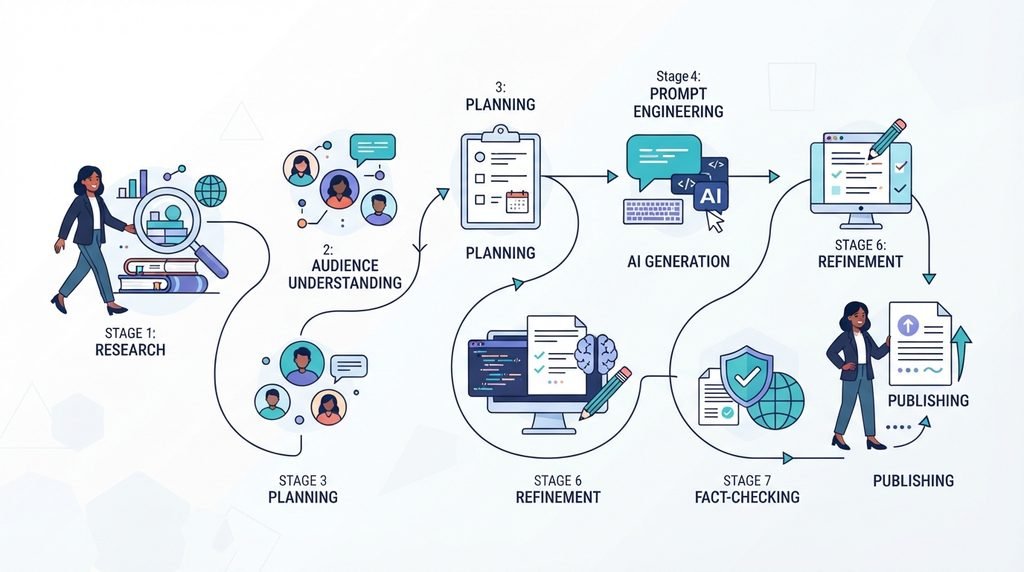
Research → Understand Audience → Plan → Prompt → Generate → Improve → Fact-Check → Publish
The goal is not to create more content simply because AI makes it easy.
The goal is to create better content that gives people a reason to keep reading, keep watching, and come back for more.
Use AI as a writing partner—not a button you press and forget.
OTHER ARTICLES